Kubernetes CPU throttling: perché i pod vengono throttlati al 40% di CPU (CFS)
Best practices for CPU limits and requests on Kubernetes
- Use CPU requests for everything
- Make sure they are accurate
- Do not use CPU limits.
Tim Hockin (one of the original Kubernetes maintainers at Google) has recommended the same for years.
CPU limits on Kubernetes are an antipattern
Many people think you need CPU limits on Kubernetes but this isn’t true. In most cases, Kubernetes CPU limits do more harm than help.
I will explain why CPU limits are harmful with three analogies between CPU starved pods and thirsty explorers lost in a desert. We will call our intrepid explorers Marcus and Teresa.
In our stories, CPU will be water and CPU starvation will be death. Like CPU, water in our story will be a renewable resource. In simple terms, if you have 100% CPU usage at a given minute, that doesn’t “use up” the CPU for the next minute. CPU renews itself from moment to moment.
Three colorful analogies about Kubernetes CPU Limits
Marcus and Teresa are travelling in the desert. They have a magical water bottle that produces 3 liters a day. Each person needs 1 liter a day to survive.
Story 1 - without limits, without requests
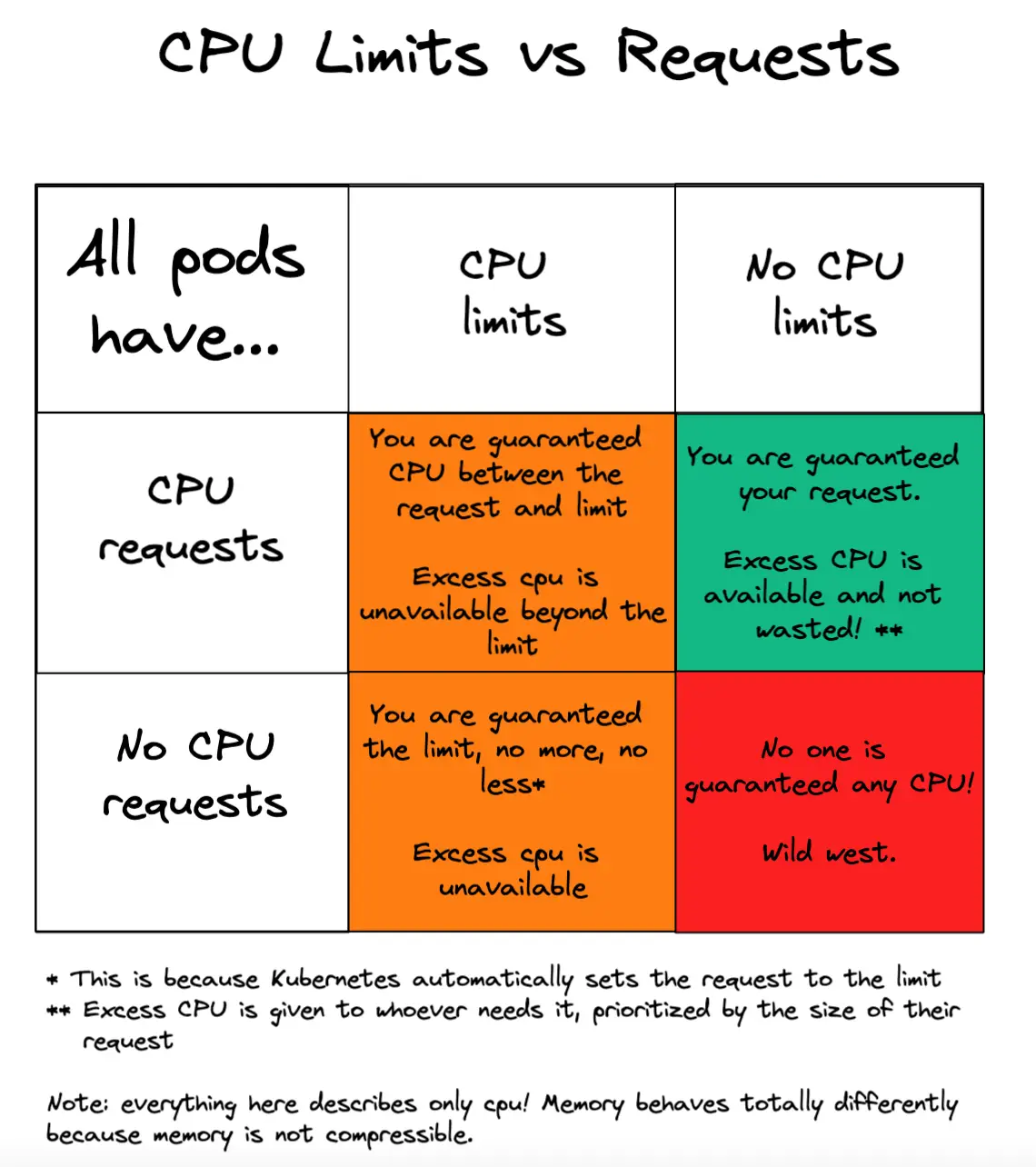
Marcus is greedy so he drinks all the water before Teresa can drink any. Teresa dies of thirst. This is because there were no limits or requests. Marcus was able to drink all the water, cause CPU starvation, and Teresa was CPU throttled.
Story 2 - with limits, with or without requests
Teresa gets very ill one day and needs some extra water. Marcus drinks his one liter and there are two liters left over. Teresa drinks one liter and now there is one liter remaining. Marcus wont let Teresa drink it because her limit is 1 liter per day so she dies of thirst. This is what happens when you have CPU limits. Resources are available but you aren’t allowed to use them.
Story 3 - without limits, with requests
Marcus gets very ill and needs extra water one day. He tries to drink the entire bottle but is stopped when only 1 liter remains in the bottle. This is saved for Teresa because she needs 1 liter a day. She drinks her 1 liter. Nothing remains. They both live. This is what happens when you have no CPU limits but you do have requests. All is good.
The above stories are surprisingly precise analogies for why CPU limits are considered harmful.
Preventing CPU throttling and insufficient CPU without limits
Many people think you need limits to prevent one pod from interfering with another pod. This is not true! You can remove Kubernetes CPU limits and still prevent a CPU hungry pod from causing CPU starvation! The trick is to just define CPU requests.
Pods always get the CPU requested by their CPU request! (They can take advantage of excess CPU too if they have no limit.)
Disable your CPU limits! If you give all your K8s pods accurate CPU requests, then no-one can throttle them because CPU is reserved for them if they need it. This has nothing to do with limits.
What about memory limits and requests?
Everything in this post is about CPU and not memory. Memory is different because it is non-compressible - once you give memory you can’t take it away without killing the process. We’ve covered the best practices for Kubernetes memory limits here. In short, our bottom line recommendation is:
- Always use memory limits
- Always use memory requests
- Always set your memory requests equal to your limitsS